

Hyatt’s loyalty program — World of Hyatt — is arguably the most rewarding in the entire industry. Whether you’re chasing elite status or just looking to get the most out of your points, Hyatt is the smartest hotel brand to commit to early on. If you can rack up nights, they have the best loyalty benefits in the game!
In this guide, I’ll show you exactly:
1️⃣ How the Hyatt Point Category System Works
2️⃣ How to Make a Free World of Hyatt Account
3️⃣ How to Transfer Points from Chase to Hyatt
4️⃣ How to Properly Book Hotels with Points on Hyatt
5️⃣ NEW HYATT CALENDAR SEARCH TOOL

1️⃣ How the Hyatt Point Category System Works
Before you transfer any points or start searching for hotels, you need to understand how Hyatt’s award chart works, because this is where the value really kicks in.
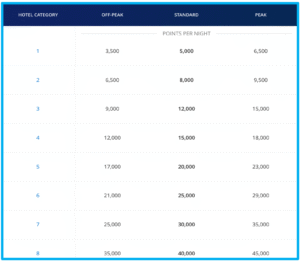
Hyatt uses a fixed award chart with categories ranging from 1 to 8 for standard hotels and A to F for all-inclusives. Each category has a set number of points required for off-peak, standard, and peak dates, but even peak pricing is often way less than what Hilton or Marriott charges for the same level of hotel.
💥 Why This Matters: Hyatt’s chart is not fully dynamic like Hilton or Marriott. That means even when cash prices skyrocket (like during a big event), the point price stays within a fixed range based off the category of the hotel.
🎤 Example: Let’s say Taylor Swift is performing in town. Hotels are suddenly $1,500+ a night. Hilton and Marriott will jack their point prices sky-high…often 120,000+ points for basic hotel!! But with Hyatt, if that hotel is a Category 4, it’ll still only cost 12,000 points (off-peak) or 15,000 points (standard) or 18,000 points (high season)
To make things even better, Hyatt doesn’t charge extra taxes or resort fees on point stays!! Truly ALL POINTS no CASH! That’s a major advantage over other programs.
2️⃣ How to Make a Free World of Hyatt Account
Before you do anything with points, you need a Hyatt account — and signing up is 100% free and takes under 2 minutes!
Here’s how to do it:
Step 1: Go to https://www.hyatt.com/ — or just download the Hyatt app from the App Store or Google Play
Step 2: Click on “Sign Up” or “Join”
Step 3: Fill in your name, email, and create a password
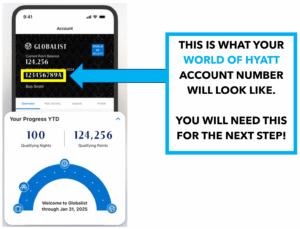
Step 4: You’ll instantly get a World of Hyatt account number — save this, because you’ll need it to transfer points
3️⃣ How to Transfer Points from Chase to Hyatt
Once your Hyatt account is set up, it’s time to move points over from Chase — and luckily, this part is super quick! Hyatt is one of the few partners where transfers happen INSTANTLY! So, if you need to book a trip ASAP, you CAN!!
Here’s how to do it:
Step 1: Log in to your Chase Ultimate Rewards portal
Step 2: Select a card that earns transferable points (Sapphire Preferred, Sapphire Reserve, or Ink Business Preferred)
Step 3: Click “Transfer to Travel Partners” and click “Hotels”
Step 4: Choose World of Hyatt from the list
Step 5: Enter your Hyatt account number and Full Name (double check it’s correct!)
Step 6: Enter the number of points you want to transfer — in 1,000 point increments
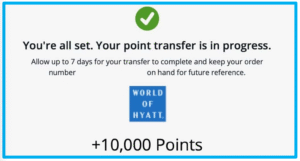
Step 7: Hit confirm — and boom, the points usually show up in your Hyatt account instantly! * Chase says it can take up to 7 days but it NEVER does! *
4️⃣ How to Properly Book Hotels with Points on Hyatt
Now that you know how to get points in your Hyatt account, it’s time to learn how you would use them!
Step 1: Go to hyatt.com or open the Hyatt app
Step 2: Log in to your World of Hyatt account
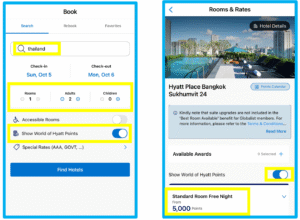
Step 3: Enter your destination, travel dates, and number of guests
Step 4: Important: Check the box that says “Show World of Hyatt Points” before hitting search
Step 5: Browse the results, and Select a Hotel.
Step 6: Click through to view room types and total point cost per night.
5️⃣ HYATT’S NEW CALENDAR AWARD SEARCH TOOL
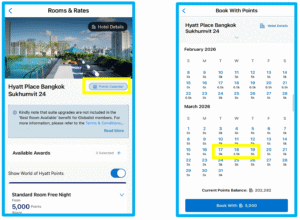
Hyatt has just RECENTLY released their new “Points Calendar” search tool which is a total game changer for easily finding award nights.
Here’s how to do it:
Step 1: Click “Points Calendar” once you are on the Hotel you want to book.
Step 2: It will open up a Calendar that shows all the availability on points. If it is greyed out on the day or month you are looking, it is sadly booked out ):
Step 3: As shown in Step One, you can see there is a slight range in point prices for the nights based upon low, normal, or high season. The good news is, it is predictable and you will NEVER see the points go above the predetermined amount on the calendar. I look to look for LOW SEASON point rates to extend out my points the most. You see below it is as low as 3,500 points per night!
Feeling overwhelmed or don’t know where to start?
I also offer 1:1 strategy calls, where I walk you through everything live! Whether you’re planning a specific vacation or just want to learn how to USE and EARN points like a pro, I’ll make sure you leave confident! Click Below!
@JakesTravelPoints